■開発環境
CentOS 5.10
■ソースコード
■実行結果
$ ./diskfree /
path=/, f_bsize=4096, f_frsize=4096, f_blocks=4495335, f_bfree=3759180, f_files=4643968, f_ffree=4526653, f_fsid=0, f_flag=0, f_namemax=255
パス            全容量          使用            使用可          使用%
/               18412MB         3015MB          15397MB         16.4%
■開発環境
CentOS 5.10
■ソースコード
■実行結果
$ ./diskfree / path=/, f_bsize=4096, f_frsize=4096, f_blocks=4495335, f_bfree=3759180, f_files=4643968, f_ffree=4526653, f_fsid=0, f_flag=0, f_namemax=255 パス 全容量 使用 使用可 使用% / 18412MB 3015MB 15397MB 16.4%
■開発環境
CentOS 5.10
■ソースコード
■実行結果
$ ./malticopy r.jpg w.jpg
read file size=2456317
test01: 0.012952sec
test02: 0.009495sec
test03: 0.000595sec
memcpy: 0.000485sec
■開発環境
CentOS 5.10
■yumでlibxmlライブラリをインストール
yum -y install libxml2-devel
■ソースコード
■実行結果
$ cat test.xml
<ROOT prop1="123">
 <Syain1>
 <Name>
 Uesugi Kensin
 </Name>
 <Age>
 42
 </Age>
 </Syain1>
 <Syain2>
 <Name>
 Takeda Singen
 </Name>
 <Age>
 47
 </Age>
 </Syain2>
</ROOT>

$ ./xmlGetTagString.o test.xml ROOT/Syain2
current name: ROOT, tagNo=0, depth=0
current name: Syain1, tagNo=1, depth=1
current name: Syain2, tagNo=1, depth=1
xmlTextReaderReadInnerXml=
 <Name>
 Takeda Singen
 </Name>
 <Age>
 47
 </Age>

$
■参考
http://faithandbrave.hateblo.jp/entry/2014/05/01/171631
http://d.hatena.ne.jp/cube_tamayura/20110615
http://egawata.hatenablog.com/entry/20110110/1294643071
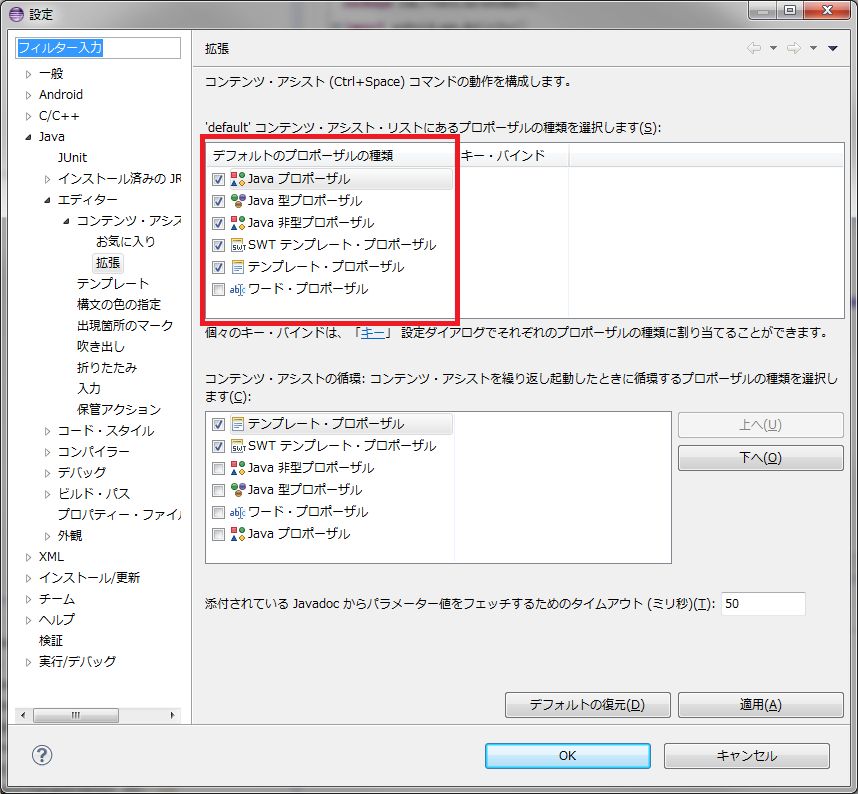
ウィンドウ→設定→Java→エディター→コンテンツ・アシスト→拡張
で、Javaプロポーザル、Java型プロポーザル、Java非型プロポーザルにチェックを付けてOK。
画面にListViewを追加して文字列を表示します。
■main.xml
<?xml version="1.0" encoding="utf-8"?>
<LinearLayout xmlns:android="http://schemas.android.com/apk/res/android"
    android:layout_width="match_parent"
    android:layout_height="match_parent"
    android:orientation="vertical" >

  <ListView
	android:id="@+id/listview"
  	android:layout_width="fill_parent"
  	android:layout_height="wrap_content" />

</LinearLayout>
■MainActivity.java
package com.example.testlistview;

import java.util.ArrayList;

import android.app.Activity;
import android.os.Bundle;
import android.widget.ArrayAdapter;
import android.widget.ListView;

public class MainActivity extends Activity {

	private ArrayList<String> list = new ArrayList<String>();

	@Override
	protected void onCreate(Bundle savedInstanceState) {
		// TODO 自動生成されたメソッド・スタブ
		super.onCreate(savedInstanceState);
		setContentView(R.layout.main);

		list.add("item 1");
		list.add("item 2");
		list.add("item 3");

		ArrayAdapter<String> adapter = new ArrayAdapter<String>(this, android.R.layout.simple_list_item_1, list);
		ListView listview = (ListView)this.findViewById(R.id.listview);
		listview.setAdapter(adapter);
	}

}
■起動画面
